Simio for FactoryLogix

See What Happens Next.

Generate a production schedule from your FactoryLogix data in one click, and test decisions before you make them.

FactoryLogix tells you what happened and what’s happening on the floor. Simio adds what comes next. It simulates your operation against real constraints, including equipment, labor, materials and changeovers, so you can see which orders are at risk, replan quickly when conditions change, and understand why an order will be late.

Four options run on the same foundation. Simio Essentials and Essentials Plus are built for FactoryLogix, with one-click scheduling and what-if analysis from the data you already trust. Simio APS and Virtual Factory Designer add full advanced planning and factory design, and work with FactoryLogix or on their own.
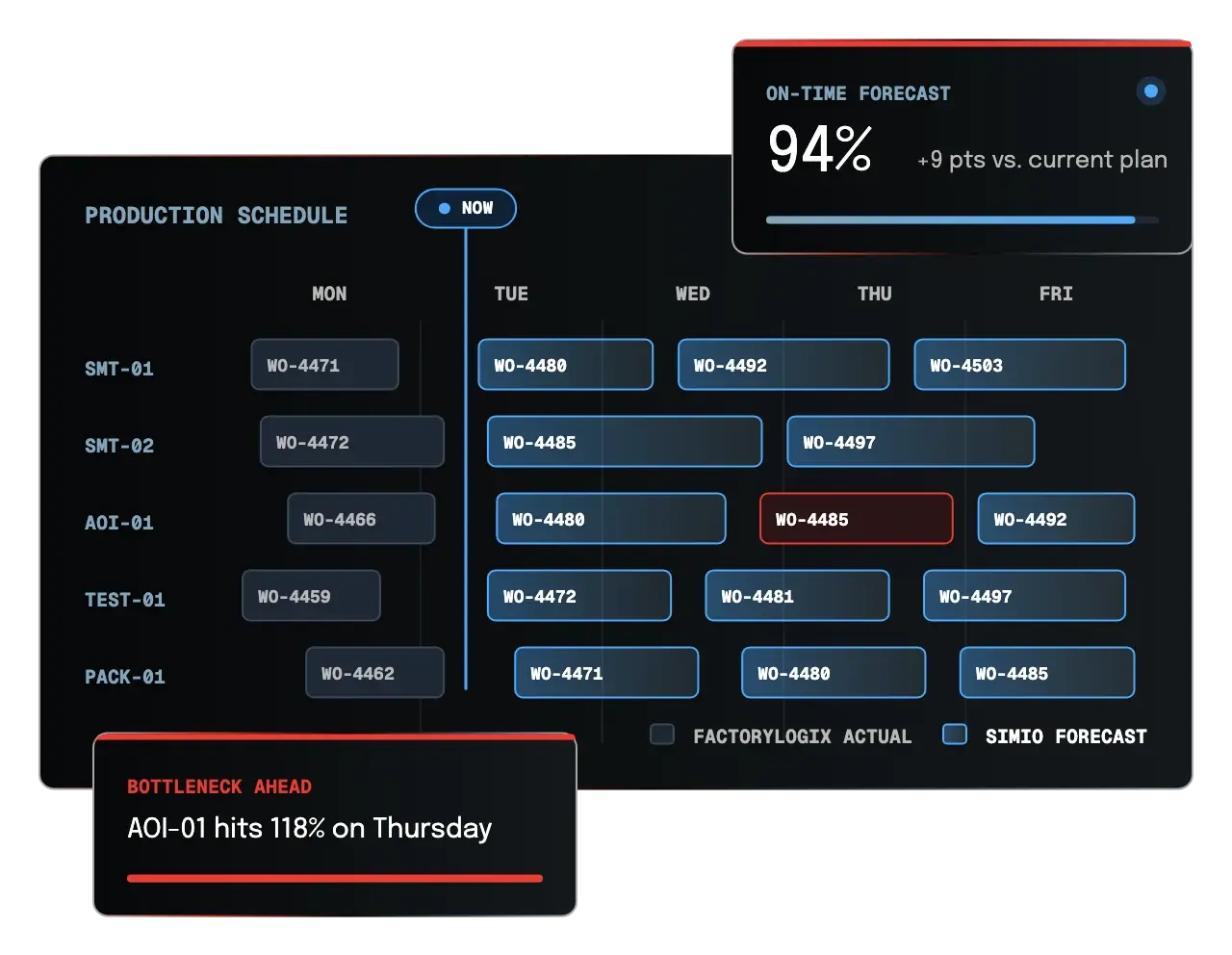
Simio forecast schedule built from FactoryLogix actuals
Why Simio

From Reactive Scheduling to Forward-Looking Planning

Most planning tools work from rules and historical averages. That holds up while conditions stay normal, but when something changes, the plan breaks down and planners end up fixing it in a spreadsheet.

Simio works differently. It simulates your operation event by event against real constraints, so the schedule is one the floor can actually run, and a new one is ready quickly when conditions change.

Simio also has AI built into the simulation itself. Neural networks embedded in the model learn from data the simulation generates and from shop-floor context, then make decisions as the plan runs. In Simio APS, that means choosing the best line for a job based on the current state of the factory, not a fixed rule. Neural networks have been making decisions inside Simio for years.

Production conditions change constantly. Here’s how Simio keeps up.

  • New orders arrive

    See the ship date you can promise before you commit

  • Equipment goes down

    Replan from the floor as it is right now

  • Materials run late

    See which orders are affected and what to run instead

  • Capacity shifts

    Know where your constraint moves before it costs you

  • Priorities change

    Change the order of work and see the impact on every other order

Simio Solutions

Choose the Level That Fits Your Operation

Simio Essentials

Generate Your Schedule in One Click

No model to build, no spreadsheet to import, no configuration screens.

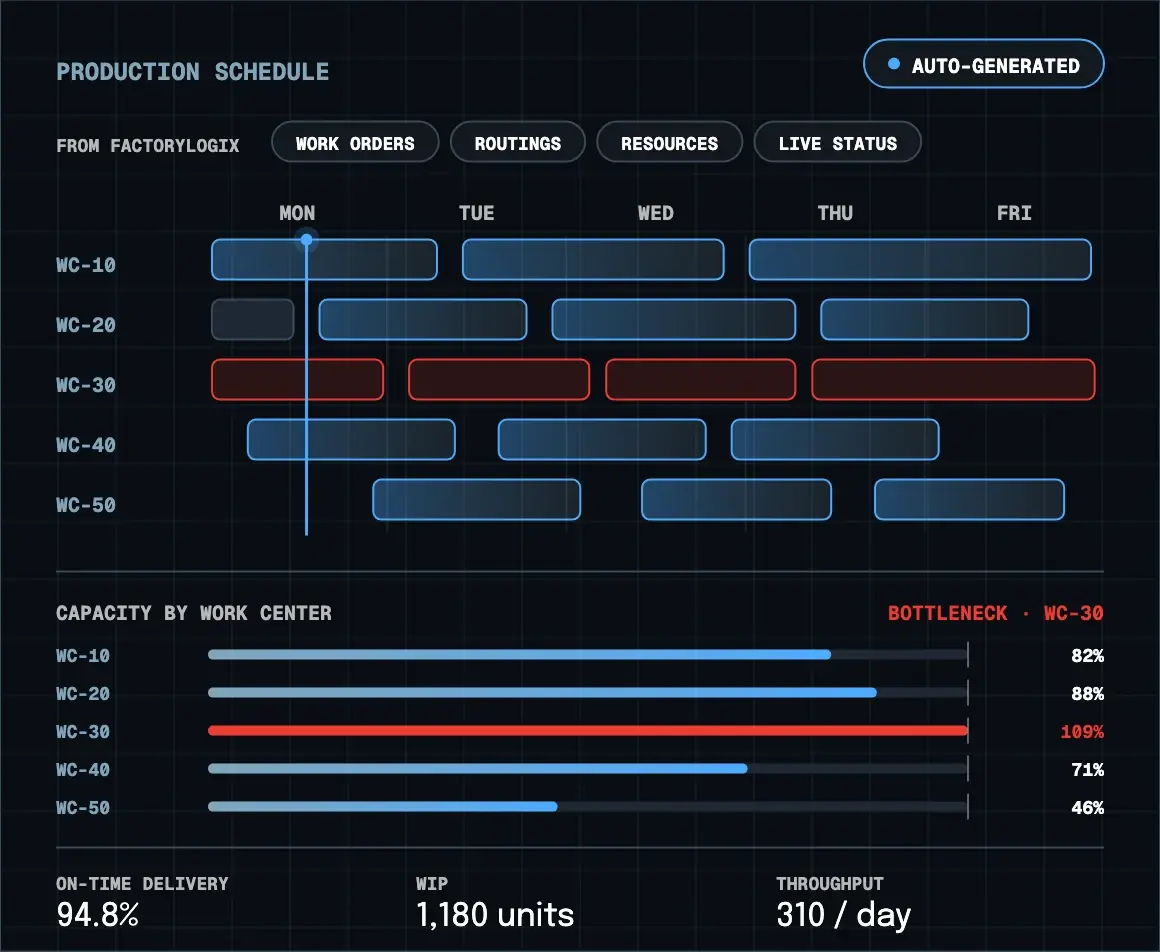
Simio Essentials reads the work orders, routings, resources and WIP already in FactoryLogix and turns them into a 60-day forward schedule in one click. The finished schedule goes back into FactoryLogix, where operators can see it. When a hot order lands or a machine goes down, click run again and get a new plan based on the floor as it is right now.

With Simio Essentials, you can:

  • Generate realistic production schedules
  • See where capacity is over- or underloaded
  • Identify bottlenecks before they disrupt production
  • Know which orders will ship late while there’s still time to act. 
  • Reduce dependence on spreadsheet-based planning

BEST FOR

FactoryLogix manufacturers that want to improve day-to-day production scheduling, capacity planning, and bottleneck visibility.

Simio Essentials production schedule and capacity by work center
Simio Essentials Plus

See What Happens Before You Decide

The same model as Essentials, now open to what-if questions.

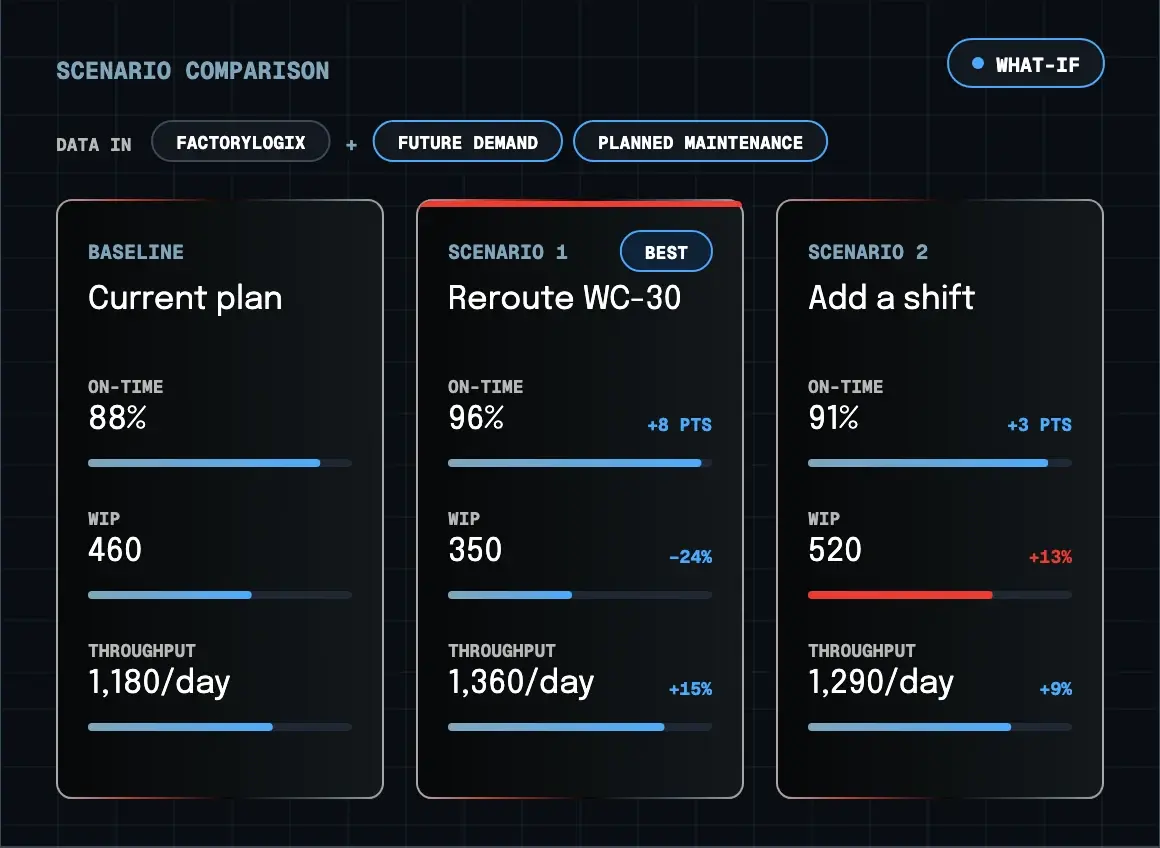
Essentials Plus uses the same model and FactoryLogix data as Simio Essentials, so you can ask what-if questions without affecting the live schedule. Change what you want to test, such as new demand, a rush order, an added workstation, a shift pattern or a maintenance window. Then compare each scenario side by side against your current plan. You can extend the horizon to months or years, so sales, operations, maintenance and leadership can test decisions before committing capital or making a promise to a customer. 

With Simio Essentials Plus, you can:

  • Compare scenarios side by side against your current schedule
  • Test a capital purchase before the purchase order goes out
  • Quote an honest ship date for a rush order and see which other orders it puts at risk
  • Find out how much growth your current capacity can absorb
  • Plan over a horizon of months or years

BEST FOR

FactoryLogix manufacturers that want to test investment, capacity and customer commitments before acting. Upgrading from Essentials is a license change, not a new install. 

Simio Essentials Plus scenario comparison
Simio APS

Plan for Greater Complexity with Confidence

Bring advanced planning, scheduling, and decision intelligence to your most complex production environments.

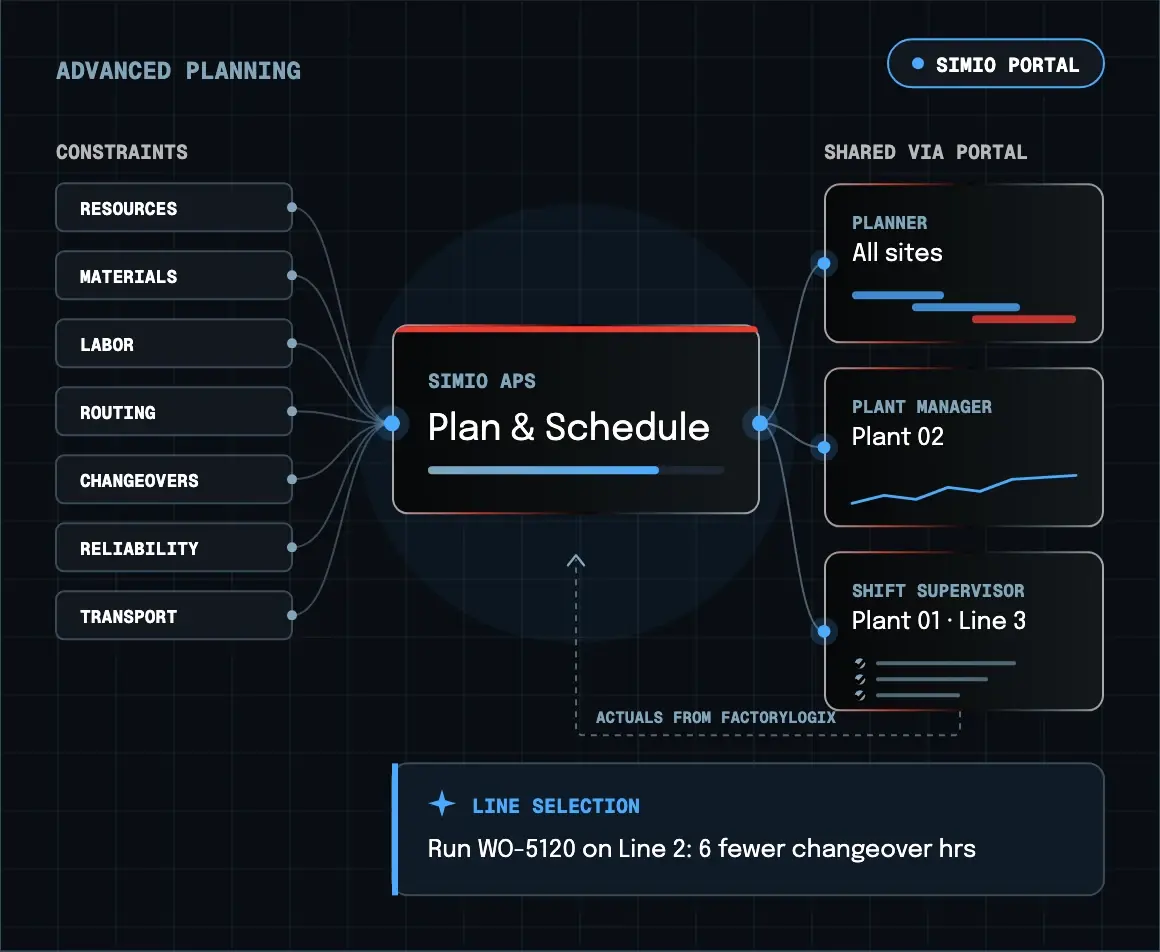
Simio APS creates realistic, executable schedules that account for complex production constraints, including resources, materials, labor, routing, and changeovers. Its cloud-based portal makes planning results accessible across teams, sites, and roles, supporting more informed decisions across the operation.

With Simio APS, you can:

  • Plan around complex production constraints
  • Run broader what-if analysis and scenario comparisons
  • Use AI-enabled intelligence to support planning decisions
  • Share planning results across teams through the Simio Portal
  • Support planning across multiple facilities
  • Connect planning more closely with shop-floor execution

BEST FOR

Manufacturers with complex planning environments that need full advanced planning and scheduling capabilities across more constraints, users, or facilities.

Simio APS constraint model shared through the Simio Portal
Simio Virtual Factory Designer

Designing or Changing the Factory?

Scheduling isn’t the only place where it’s valuable to know what will happen before you commit.

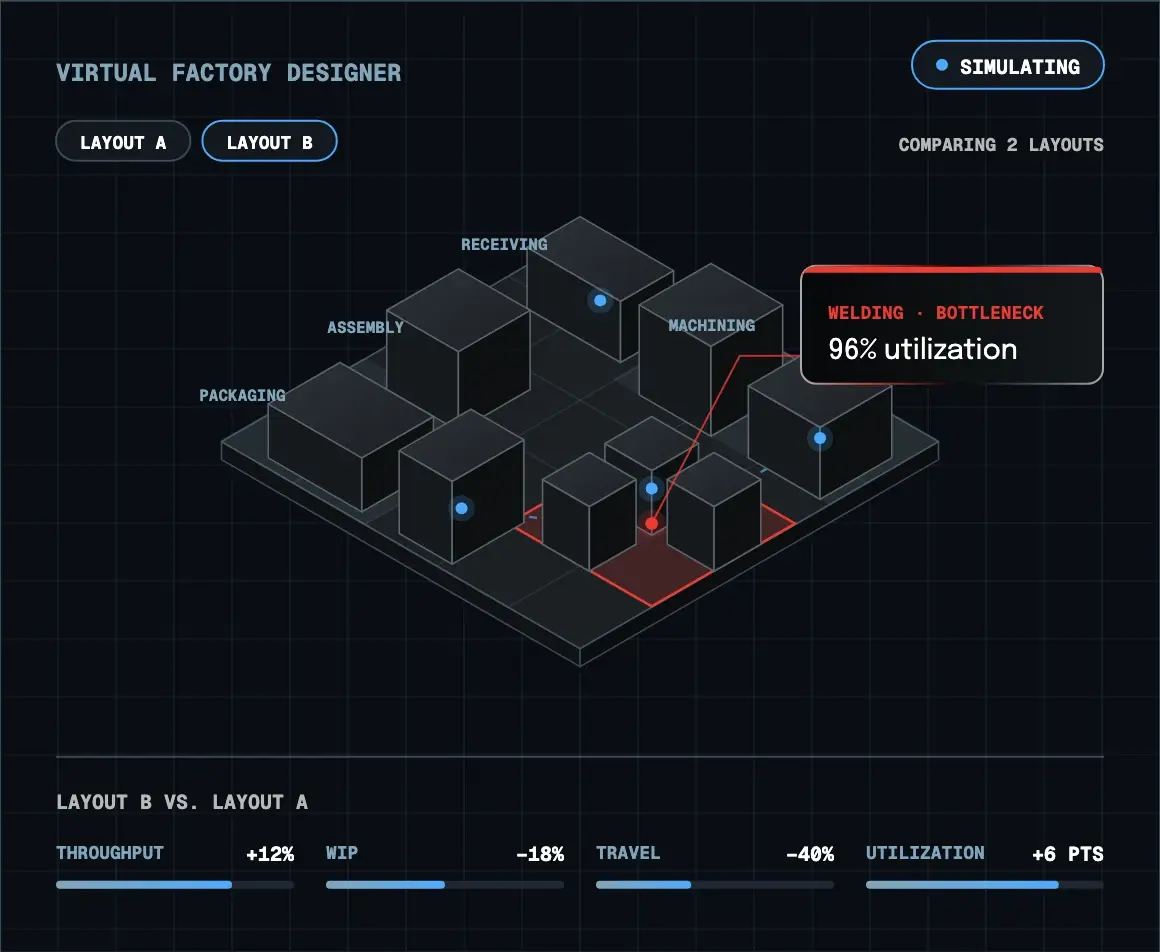
Simio Virtual Factory Designer lets manufacturers evaluate proposed layouts, production cells, and major operational changes using simulation before investing in construction, equipment or floor changes. Teams can compare alternatives, identify potential bottlenecks, and understand how work will flow through a proposed design before it’s built.

BEST FOR

New facilities, layout changes, production cell redesigns, and other major operational changes.

Simio Virtual Factory Designer comparing two layouts
Compare Solutions

Find Your Fit

SIMIO Essentials What should we schedule?
Better daily scheduling
SIMIO Essentials Plus What happens if we change it?
Better decision-making
SIMIO APS How do we plan across greater complexity?
Advanced planning & scheduling
CAPABILITIES
Production scheduling Included in Essentials Included in Essentials Plus Included in APS
Capacity & bottleneck visibility Included in Essentials Included in Essentials Plus Included in APS
What-if scenario comparison Not included in Essentials Included in Essentials Plus Included in APS
Expanded planning data Not included in Essentials Included in Essentials Plus Included in APS
Full constraint modeling Not included in Essentials Not included in Essentials Plus Included in APS
Cloud portal & distribution Not included in Essentials Not included in Essentials Plus Included in APS
AI-enabled decision support Not included in Essentials Not included in Essentials Plus Included in APS
Multi-site planning Not included in Essentials Not included in Essentials Plus Included in APS
Grow on One Platform

Start Where You Are. Expand When You Need To.

Pick what fits your operation today and add more as you grow. If you run FactoryLogix, everything connects to your shop floor data from day one.

Start with better daily scheduling in Simio Essentials, then move to scenario analysis with Essentials Plus or full advanced planning and scheduling with Simio APS. When you’re planning a new line, a layout change or an entirely new factory, Factory Designer lets you test it before you commit the capital. 

Engineer reviewing a production plan on a tablet beside a robotic arm

Ready to See Which Simio Solution Fits Your Operation?